Personal · 2026 · Consumer apps
Directed with Claude Code and shipped
Upbeat
A Mac app that turns the notch into a quiet control deck, with a teleprompter right under the camera.
- My role
- Product Design
- Team
- Me, directing Claude Code
- When
- 2026
- Platforms
- macOS, Website
Visit Upbeat’s website, opens in a new tab
- shipped October 21, 2026
- 1.0
- one-time Pro upgrade, no subscription
- Free + Pro
The 30-second version
- Problem
- The notch sits right beside the camera and the space around it goes unused. And when you read notes on a video call, your eyes drop away from the camera.
- What I did
- Directed a Mac app with Claude Code that shows what's next in the notch and hangs a teleprompter just under the camera.
- Result
- Version 1.0 shipped on October 21, 2026, as a free download from getupbeat.app, with the teleprompter as a paid Pro upgrade.
Context and constraints
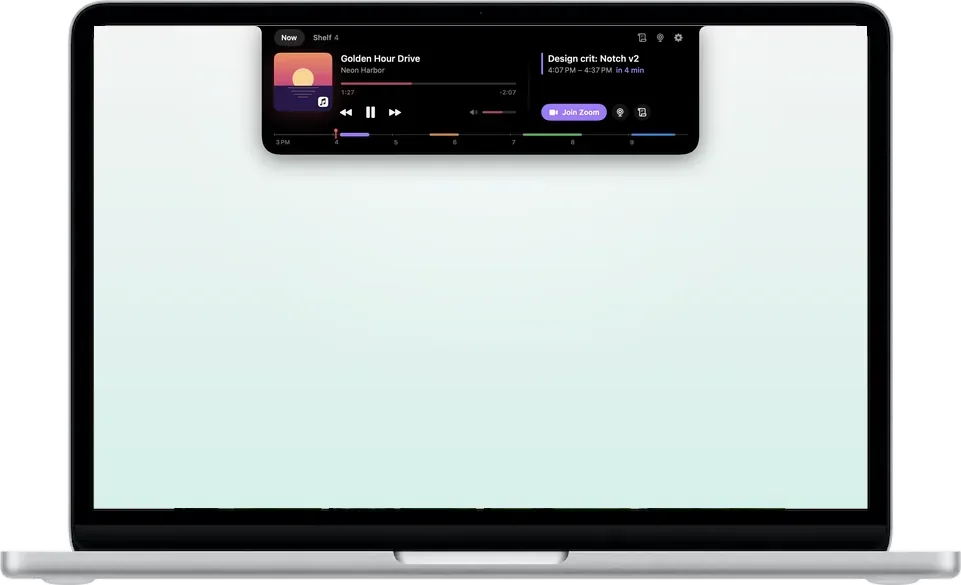
Upbeat lives in the notch at the top of a MacBook screen. Closed, it shows one thing at a time: a countdown to your next meeting, a flash when you plug in, or album art while music plays. Hover over it or press ⌃⌥N and it opens to what's playing beside your next meeting, with one click to join the call, or to a shelf where you can park files. The teleprompter hangs from the notch, right under the camera.
My role and the team
Just me, directing Claude Code. It built the Mac app in SwiftUI and AppKit, the website in React, and the license server behind Upbeat Pro on Firebase and Stripe. I set the direction and decided what stayed and what got cut.
The problem
The notch sits at the top of every new MacBook screen, right beside the camera, and the space around it goes unused. The things you glance at all day, like your next meeting or what's playing, live in other windows. And when you read notes on a video call, your eyes drop away from the camera.
Following your voice
With Follow my voice on, the prompter moves as you read aloud. Speech is recognized on the Mac and nothing is recorded. It matches what it hears against the script near your place, so a skipped word or an ad-lib doesn't throw it, and it only jumps ahead after a run of matching words, about three for a skipped sentence. The line you're reading holds still, and the next one glides up as you finish it.
The details
One pass went over every surface for spacing, type and hover. There's one type ramp on macOS's own sizes now, every control is 28pt tall, and every control has a hover state. About half had none before.
Key decisions
01 / 04
One thing at a time
- The call
- Closed, the notch shows only the most important thing: a meeting countdown first, then charging, then music.
- Why
- The first build showed the same three tiles every time it opened, whatever was going on.
02 / 04
Use what macOS already has
- The call
- Sharing goes through the Share menu and previews through Quick Look. Finder's Services menu, Shortcuts, Siri and Spotlight all reach it, and each permission is asked the first time its feature is used.
- Why
- It works with the rest of the Mac instead of living alone in the notch.
03 / 04
Read right under the camera
- The call
- The teleprompter hangs from the notch, with the line you're reading about 6pt below the camera.
- Why
- You can read your notes and still look people in the eye.
04 / 04
No subscription
- The call
- The app is free, and the teleprompter is a one-time Pro upgrade with a 14-day trial that needs no account.
- Why
- The work happens on the Mac, so there are no running costs to pass on.
The work
How it scaled
The app talks to a small license server. Stripe payments turn into license keys through Firebase Cloud Functions, and activations come back as signed tokens the app checks on its own, so Pro keeps working offline. The website shares the app's brand tokens, and the notch at the top of every page uses the app's own springs.
Results
Version 1.0 came out on October 21, 2026, as a signed and notarized download from getupbeat.app. Upbeat Pro went on sale the same day.
- shipped October 21, 2026
- 1.0
- one-time Pro upgrade, no subscription
- Free + Pro
Reflection
There was a DJ character for the music player, a little figure whose head nodded to the beat, and I cut it. In still frames it looked fine. Moving, its head came apart from its neck on every bob, and it couldn't keep time without hearing the real beat. A motion rework and on-device beat detection didn't save it, so it's gone, along with the audio permission it needed. What's left is a small equalizer that pulses on the beat when Music knows the track's tempo.